---
title: Roles and Permissions
---
::: warning UAT release
This guide describes the upcoming portal update. Some screens or actions may differ in the current UAT portal.
:::
# Roles and Permissions
**Who is this for:** All Roles Platform Admin Developer Admin Customer Admin
**Prerequisites:**
- An active user account created by an administrator (public self-registration is disabled).
- To view the in-app permissions table, your role must have user-management access (`Platform administrator`, `Company administrator`, or `Customer administrator`).
---
## How Access Works: Organization Tier × Role
In WattDee, **access is never granted per individual site**. Every user's access comes from two facts enforced by the server:
1. **Organization Tier** determines **which companies and sites** you can reach.
2. **Role within that Organization** determines **which actions** you are allowed to perform on those companies and sites.
::: warning Same Role Name, Different Powers Across Tiers
The `ADMIN` role does **not** mean the same thing in every organization:
- `ADMIN` in the **Platform owner** organization (**Platform administrator**) manages all companies, all sites, shared reference data, and system settings.
- `ADMIN` in a **Solar developer** organization (**Company administrator**) manages only their own company, their own customer companies, their developed sites, meters, and billing.
- `ADMIN` in a **Customer company** (**Customer administrator**) manages only staff inside their own customer company and countersigns approved invoices. They cannot edit meters, contracts, or draft invoices.
:::
---
## Organization Tiers & Data Scope
| Organization Tier | UI Label | Reachable Sites | Primary Purpose |
| :--- | :--- | :--- | :--- |
| **Platform owner** (`SUPER_ADMIN`) | **Platform owner** | **All companies and all sites** | Platform-wide governance: developer onboarding, electricity tariffs, monthly Ft rates, public holidays, bank accounts, VPN profiles, database health, and audit logs. |
| **Solar developer** (`DEVELOPER`) | **Solar developer** | **Sites developed by the company** and its customer companies | Onboard off-taker customers, set up sites and PPA contracts, register/operate meters, repair telemetry, and issue/approve invoices. |
| **Customer company** (`OFFTAKER`) | **Customer company** | **Sites where the company buys power** | Monitor generation, review 15-minute data, view approved invoices, and countersign invoices. |
---
## Roles by Organization Tier
### 1. Platform Owner Tier
| Role Code | UI Title | Access Level | Capabilities & Scope |
| :--- | :--- | :--- | :--- |
| `ADMIN` | **Platform administrator** | Manage | Full platform authority (all 33 capabilities): create/delete companies, change company types, set active meter limits, manage users across all organizations, configure tariffs, publish monthly Ft rates, edit public holidays, manage bank accounts, manage VPN profiles, override meter serial numbers and confirm HES-detected swaps, issue early invoices, view database health, and inspect system audit logs. |
| `SERVICE` | **Central operations team** | Operate | Monitors meters and communications across **all sites**: register/edit/replace meters (`meter.write`), run connection tests & read-now commands, view meter IP/port/SIM details, reprocess/repair 15-minute telemetry, view data quality reasons, acknowledge/snooze/assign meter alarms, view parallel billing comparisons, and read Ft rates/holidays. *(Cannot manage companies/users, change tariffs/banks/holidays, or generate/approve invoices.)* |
### 2. Solar Developer Tier
| Role Code | UI Title | Access Level | Capabilities & Scope |
| :--- | :--- | :--- | :--- |
| `ADMIN` | **Company administrator** | Manage | Edits own developer profile, logo, and invoice signature; creates/edits/deletes its customer companies and their users; manages developer staff; creates/edits sites and PPA contracts; registers/edits/swaps meters; runs telemetry repair; manages alerts; and executes the full invoice lifecycle including early invoice issuance (`invoice.issueEarly`). *(Platform-only controls (creating developer companies, Ft rates, public holidays, bank accounts, VPN profile management, and manual serial override/swap confirmation) remain with the Platform administrator.)* |
| `SERVICE` | **O&M engineer** | Operate | Registers/edits/swaps meters, runs connection tests & read-now commands, views meter IP/port/SIM details, repairs/imports 15-minute telemetry, views data quality reasons, manages meter alarms, views parallel billing comparisons, and performs the **Step 2 technical invoice review (`invoice.check`)**. *(Cannot generate or approve invoices.)* |
| `ACCOUNTING` | **Accounting** | Billing | Views draft and approved invoices, generates/recalculates invoices, performs **Step 3 final invoice approval (`invoice.approve`)**, voids invoices with a reason, deletes draft invoices, views parallel billing comparisons, and reads Ft rates, holidays, and bank accounts. *(Under the 3-tier billing rule, Step 2 technical checker and Step 3 approver must be two different people.)* |
| `OPERATOR` | **System operator** | Operate | Reviews meters and generation, runs connection tests and read-now commands, views meter network details and 15-minute data quality reasons, dispatches and manages alarms, and reads Ft rates/holidays. *(Cannot add/edit/delete meters or edit/import telemetry.)* |
### 3. Customer Company Tier (Off-taker)
| Role Code | UI Title | Access Level | Capabilities & Scope |
| :--- | :--- | :--- | :--- |
| `ADMIN` | **Customer administrator** | Manage | Updates own customer company profile, logo, and signature; adds, edits, and suspends users inside their own company; views coworkers' emails and roles; views the customer permissions table; views **APPROVED** invoices and countersigns them on behalf of the customer. *(Never sees `DRAFT` or `CHECKED` invoices.)* |
| `CUSTOMER` | **Customer representative** | Billing | Views **APPROVED** invoices and countersigns them on behalf of the customer, alongside site generation dashboards and 15-minute data. *(Sees colleague names only: no colleague emails/roles and no Settings access.)* |
| `READER` | **Read only** | Read only | Views Dashboard, Meter Monitoring, and View Data / Analytics for the company's sites only. *(Cannot access Billing History or Settings, and cannot modify any data.)* |
---
## Viewing the Read-Only Permissions Matrix
Administrators can verify the live server-enforced permission matrix at any time inside the portal:
1. Click **Settings** in the left navigation sidebar.
2. Open a company (Solar Developer administrators are taken directly to their company workspace).
3. Select the **People & access** tab.
4. Click **Role permissions** in the sub-navigation bar at the top.
5. Review the matrix grouped into **People and organizations**, **Sites and meters**, **Billing and invoices**, and **Shared reference data**. Your current role column is highlighted as **Your role**, and each column header shows the granted count (for example, `26 / 26`).
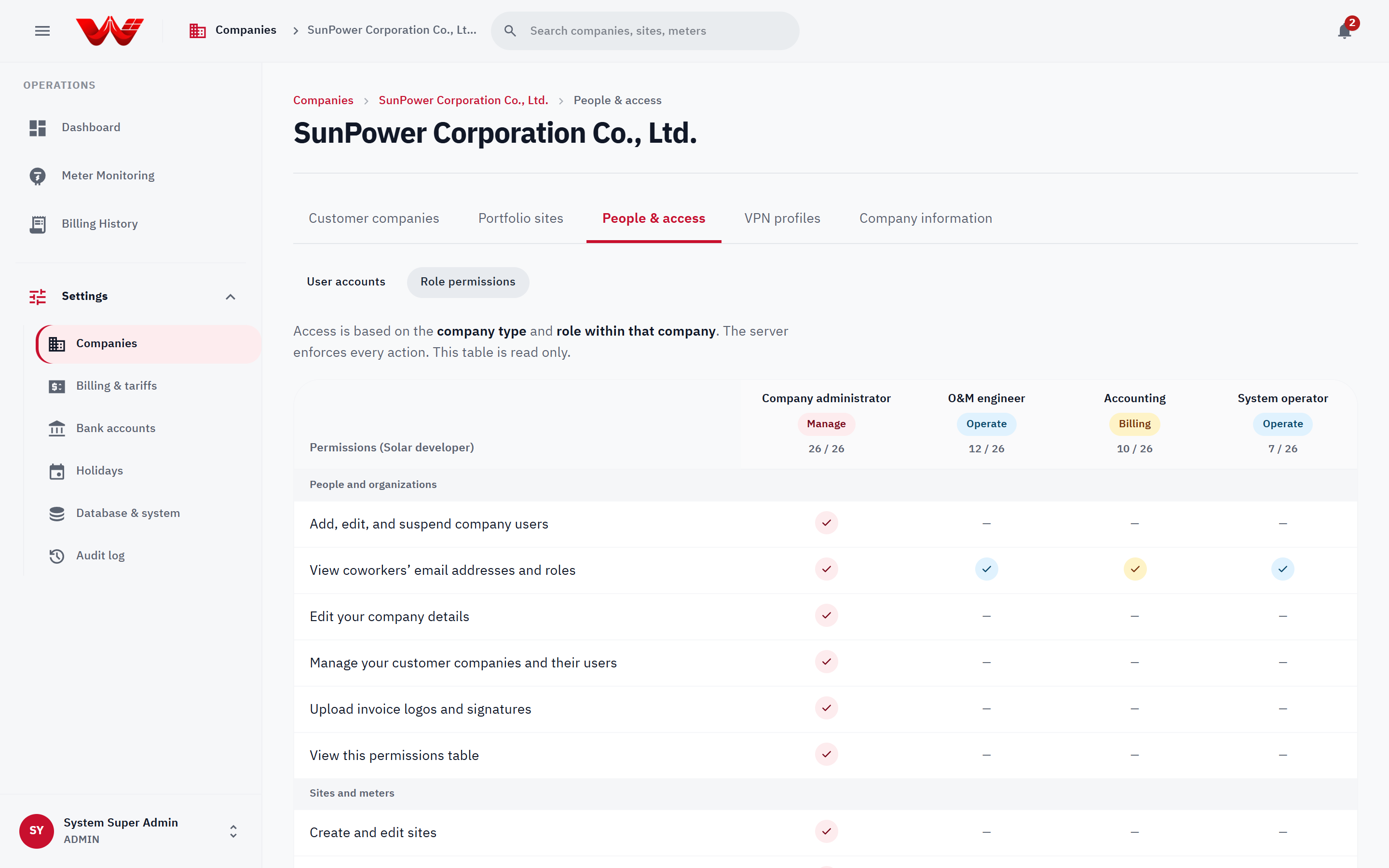
*Figure 1: Read-only Role permissions matrix showing capabilities enforced by the server for the selected organization tier.*
::: tip Platform-Reserved Capabilities
When viewing **Role permissions** inside a Solar Developer or Customer Company, platform-only permissions (such as publishing monthly Ft rates, editing public holidays, managing bank accounts, creating developer companies, and managing VPNs) are omitted from the company grid with a note explaining they are reserved for **Platform administrators**.
:::
---
## Next Steps
- [Login and Account Management](./02-login-and-account)
- [Platform Admin Guide](./03-platform-admin-guide)
- [Developer Admin Guide](./04-developer-admin-guide)